Scrapademic
Scrapademic is a JavaScript based CLI tool and Node.js library that extracts structured publication data from Google Scholar profiles. It is built for researchers developers and engineers who want fast reliable access to academic metadata without manual effort.
The tool uses a headless browser with stealth techniques to closely mimic real user behavior. This allows it to load complete publication histories including older papers that are usually hidden behind pagination.
This project reflects my interest in automation research tooling and building practical developer friendly systems.
What it does
Scrapademic collects full publication records from a Google Scholar author profile. It extracts titles authors journal or conference names publication years and citation counts. Results can be sorted by citation impact or by year.
It works both as a command line tool and as a reusable JavaScript library.
Key capabilities
- Scrapes Google Scholar author profiles
- Loads all publications not only recent ones
- Sorts by citation count or publication year
- Uses stealth techniques to reduce bot detection
- Works as a CLI tool and Node.js library
- Exports data to text JSON CSV SQL or Markdown
Installation
- For global CLI usage
bashnpm install -g scrapademic
- For using inside a Node.js project
bashnpm install scrapademic
CLI usage
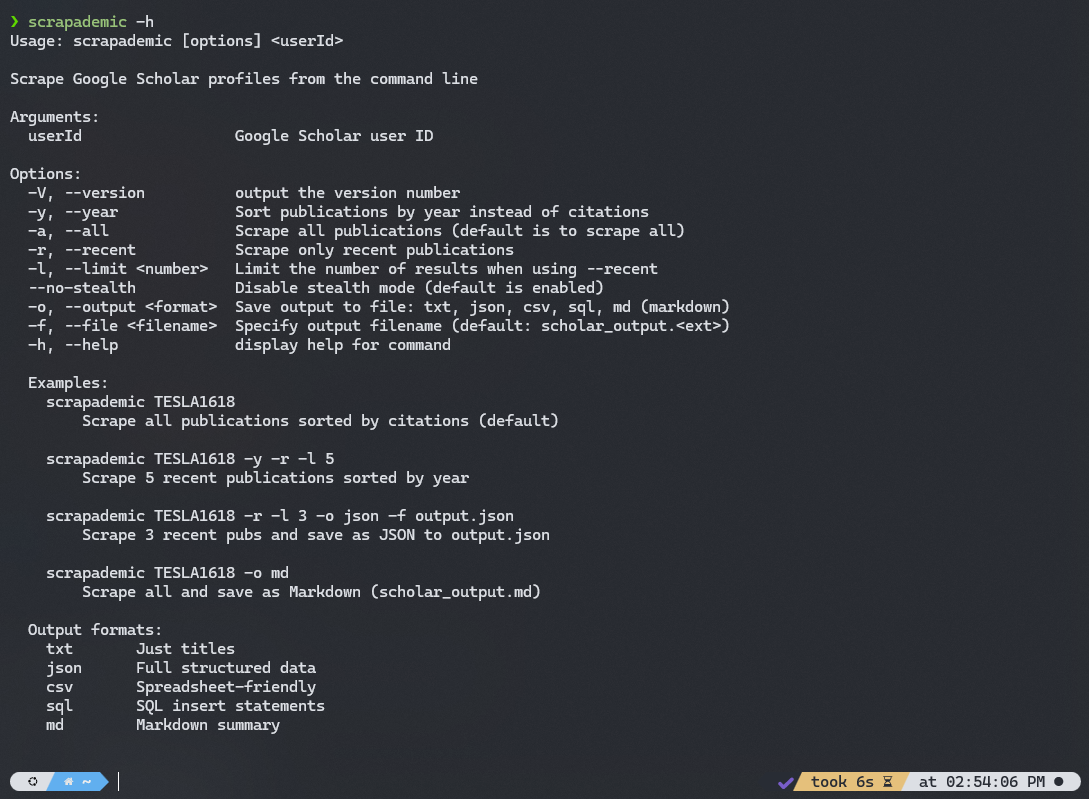
- Basic syntax
scrapademic <userId> [options]Examples
scrapademic TESLA1618Scrapes all publications sorted by citation count
scrapademic TESLA1618 -y -r -l 5 scrapademic TESLA1618 -r -l 3 -o json -f output.json Scrapes three recent publications and saves them as JSON
scrapademic TESLA1618 -o md Scrapes all publications and saves them as a Markdown file
CLI options
- userId Required Google Scholar user ID
- -y or --year Sort publications by year instead of citations
- -a or --all Scrape all publications default behavior
- -r or --recent Scrape only recent publications
- -l or --limit Limit number of publications when using recent mode
- --no-stealth Disable stealth mode
- -o or --output Output format txt json csv sql or md
- -f or --file Specify output filename
Library usage
JavaScript example
javascriptimport { scrapeScholar } from "scrapademic" const data = await scrapeScholar("TESLA1618", { sortBy: "year", allPublications: true, limit: 10, useStealth: true }) console.log(data)
Example Output:
json[ { "title": "Deep Learning for Cats", "authors": ["Jane Doe", "John Smith", "and others"], "journal": "Journal of Feline Studies", "year": "2022", "citedBy": 54 } ]
| Option | Type | Default | Description |
|---|---|---|---|
| sortBy | String | "citations" | Sort publications by citations or year |
| allPublications | Boolean | true | If true, loads all papers by clicking Show more repeatedly |
| limit | Number | 6 | If allPublications is false, sets max publications to fetch |
| useStealth | Boolean | true | Use Puppeteer stealth plugin to avoid detection |
Output formats
- txt: One title per line
- json: Structured publication data
- csv: Spreadsheet friendly format
- sql: SQL insert statements
- md: Markdown formatted list
Technical overview
Scrapademic is built on Puppeteer with an added stealth layer. It dynamically interacts with the page by clicking load more buttons and waiting for content to stabilize which closely matches real user behavior.
The same scraping core powers both the CLI and the library API.
https://www.npmjs.com/package/scrapademic